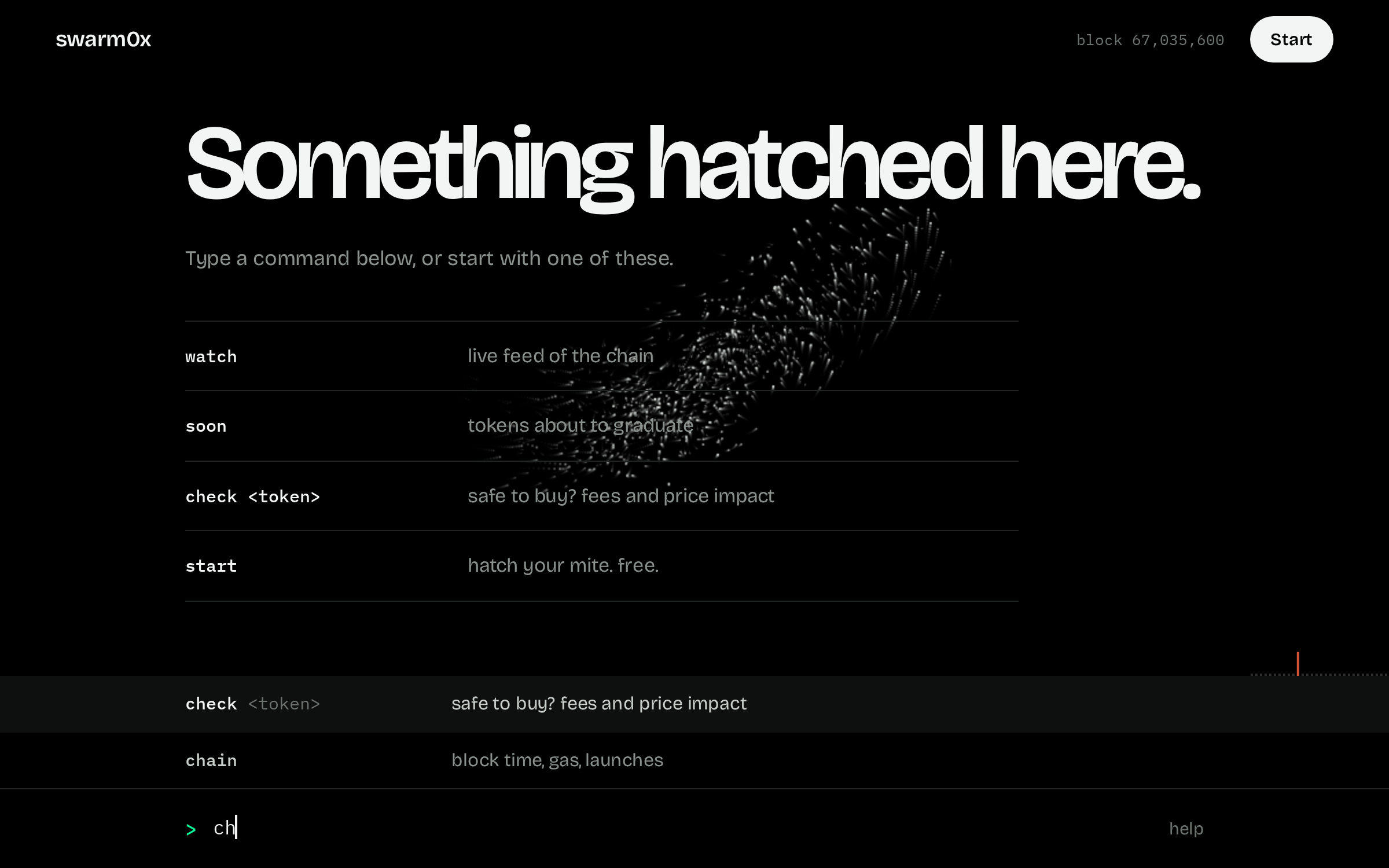
You type a word, press enter, and read the answer. This page covers all 50 commands. You do not have to memorise any of it. Start typing in the console and it suggests the rest.
The basics
The console is one bar at the bottom of the screen. That is the whole interface.
Open app.swarm0x.sh and start typing. Suggestions show up above the bar. Press tab or tap one to pick it.
You can type what you want instead of a command name. Type alert and it offers the commands that send alerts.
Most commands work straight away, with no sign in. A few keep something for you, like the wallets you follow or your alerts. Those are marked Needs a mite. A mite is your free account here, tied to your wallet. Type start. It takes one signature and nothing is sent or spent.
Click any address in a result and it drops into the bar, ready to use with the next command.
Live feeds keep running until you press Stop.
Type two letters and the console suggests the rest.The answer comes first, in large type. The detail sits under it.
Start here
A few commands get you going.
now
No sign in needed
The short list of what is worth a look this minute, anywhere on the chain, best first. It has two parts. On the curve is Pons launches that have not graduated yet. On a pool is everything else: any token trading on Uniswap v4 or v3, and Pons tokens after they graduate. It is what you see when you come back to the console, so you never start from a blank screen.
Type
You get
12 tokens worth a look right now.
100 top score, afterhours   643 buyers in 10 minutes   36.66 eth came in, net of sells

On the curve                                pons launches that have not graduated
token     score   full   buyers   eth in   deployer       notes
haven        91    45%       25    1.098   first launch   clean
ring         52    29%       18    0.452   first launch   clean
dots         33    15%       14    0.653   first launch   barely filled

On a pool         anywhere on the chain. each one was bought and sold in a test first
token        score   buyers   eth in   market cap   round trip   where        notes
afterhours     100       38    4.645   $206k        lose 0.0%    uniswap v4   clean
gloob           84       21    2.127   $80k         lose 2.0%    uniswap v4   clean
if              55        9    1.651   $1.2m        lose 2.0%    uniswap v3   clean
Score runs from 0 to 100. It goes up with the ETH and the number of different wallets coming in over the last ten minutes. It wants both. A lot of money from one wallet is a whale, and many wallets with no money are bots.
Most of the chain trades outside Pons, and most pools out there are traps. So a pool token is never listed on its trading alone. The nest first buys and sells it in a test, the same test check runs. A token that cannot be sold is never listed. A pool that keeps a tenth or more of every swap is never listed.
Round trip is what that test lost, buying 0.1 ETH and selling straight back. A token that only earns a warning, like heavy fees or a thin pool, is listed lower with the warning in its notes.
A pool with a hook that is not Pons' own is marked, because a hook can change what a trade costs.
On the curve, a token whose deployer or creator already sold is never listed. The score is cut for a creator tax above 5%, a wallet with 5 or more launches and none graduated, one funder behind many of the early buyers, a curve under 15% or over 90% full, and a curve older than 3 hours. The notes column says which.
A token needs a score of 25 or more to make the list, and you see seven of each at most.
eth in is buys minus sells. A big number with few buyers is one wallet, not a crowd.
Right after the nest restarts, or when nobody has looked for a while, the pool list can be short for a few seconds while the nest tests what is moving. It says so when that happens.
It is a list of what is moving, not advice. Run check on a token before you buy it.
start[appetite]
No sign in neededAlso answers to hatch
Makes your mite. That is your account here. It is free, you get one per wallet, and it is yours for good. Your wallet asks you to sign one line of text. Nothing is sent, spent or approved.
Type
You get
hatched. MITE-7BEF, #4 of the first thousand.
your mite is a weevil. it eats rug patterns, drainers, honeypot code.
If your browser has more than one wallet, the console lists them and you pick one. It never grabs a wallet on its own.
No wallet in this browser? Open app.swarm0x.sh inside your wallet's own browser.
The appetite decides what your mite looks for first. Leave it out and one is picked for you. You can change it later with appetite.
watch[stocks]
No sign in neededAlso answers to forage
A live feed of the chain. You see new tokens, buys and sells of 0.1 ETH and up, tokens graduating, big transfers, and deployers moving their own supply.
Type
You get
09:39:57  launch    robottery    0x59b4…cd89  by 0x1f65…bd52 tax 3.0%
09:39:57  buy       robottery    0.1250 eth $330  0xe33e…2948 curve 3%
09:40:03  sell      ants         0.3697 eth $976  0x7784…169e curve 26%
Press Stop, or type stop, to end it.
Without a mite it runs for 90 seconds. With one it runs until you stop it.
watch stocks shows only Robinhood stock tokens. Add an appetite, like watch weevil, to see only what that appetite looks for.
Amber rows are alerts. Rust coloured rows are threats, like a deployer selling.
help[command]
No sign in needed
Lists every command with a few words on what it does, grouped the same way as this guide. Click one to use it. For how a command works, this guide is the place. Add a command name for a short reminder.
Type
You rarely need it. Start typing in the console and it suggests commands as you go. You can even type what you want, like alert, and it finds the command that does it.
ask<a question>
Needs a mite
Ask about a token, a wallet or the chain in your own words. The answer is looked up with the same commands you could type yourself, check, scan, smart, history, now and the rest. It does not guess, and it cannot trade or sign anything.
Type
You get
The top mover is m0tion at 0xf05da7d8c791c9a2f1bbfbae0d9b0d29b8a10c2d. Score 100, 217 buyers in ten minutes, net 7.93 eth coming in. Still on the curve, 53% full.

The check says ok. Buys and sells go through. No flags. Round trip costs about 2%, from a 1% buy tax and 1% sell tax on the curve. Deployer is on their first launch and has not sold.

looked up: moving now, check token. 7 questions left today.
Every account gets 10 questions a day, because each one costs the nest money to answer. An answer takes from a few seconds to half a minute.
Each question stands alone. It does not remember the one before, so put everything in one line.
It tells you what the chain shows and what a trade would cost. It does not tell you what to do, and it is not financial advice.
A symbol can be copied by anyone. When you ask about a token by name, the answer says which address it looked at.
Before you buy
Run these on a token before you put money in.
check<token>
No sign in neededAlso answers to taste
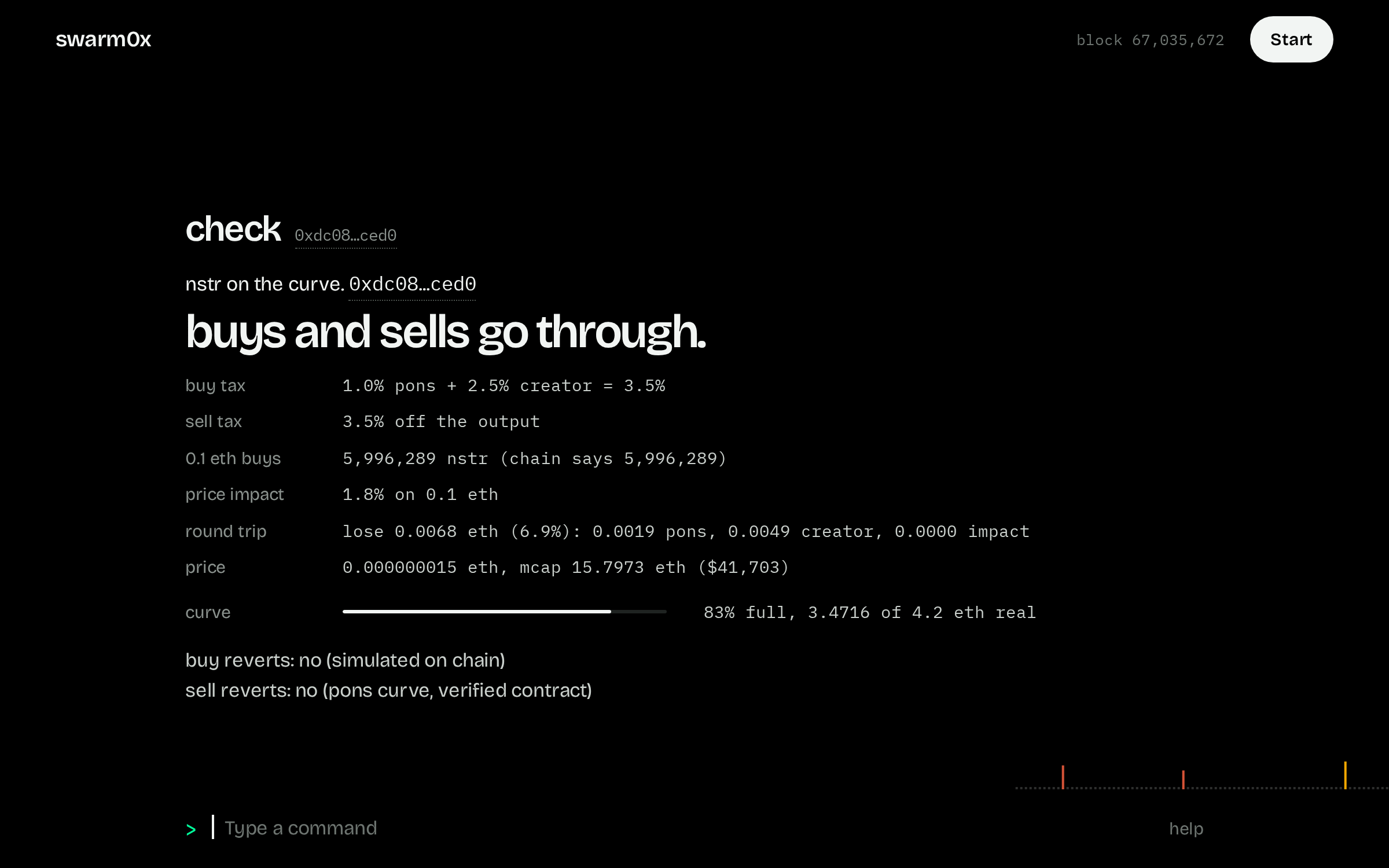
The one to run before you buy. It pretends to buy 0.1 ETH of the token and sell it straight back, on the real chain, without spending anything. The big first line is the answer. Under it are the three numbers that matter, then the trade and the token in detail.
Type
You get
nstr on the curve.
buys and sells go through.
6.9% lost on a round trip   3.5% tax each way   $32,752 market cap
curve          83% full, 3.47 of 4.2 eth real

Trade                            0.1 eth in and straight back out. nothing was sent
round trip     lose 0.0068 eth (6.9%): 0.0010 pons, 0.0025 creator, 0.0033 impact
buy tax        1.0% pons + 2.5% creator = 3.5%
sell tax       3.5% off the output
0.1 eth buys   5,996,289 nstr
buy            goes through, simulated on chain
sell           goes through. pons curve, verified contract
The big first line is the answer. If it says cannot be sold. in rust, walk away.
Round trip is what you would lose buying and selling right away. It is the fees plus the price you move.
It works on any token on the chain, not only Pons launches. For the rest it finds the token's pool on Uniswap v3 or v4, picks the one that fills best, and makes the same buy and sell there.
Because the trade is real, it catches what a price quote cannot. A token that blocks selling fails on the sell. A pool that keeps 81% of every swap shows up as an 81% loss, and the first line says so.
It also tells a greedy pool from an empty one. If a tiny trade loses as much as the full one, that is fees. If only the full one hurts, the pool is just thin, and it says that instead.
buy<token> [amount]
Needs a mite
Buy a token with your own wallet, from the app. The nest writes the trade, runs it from your wallet inside a simulation, and shows what will go in and what should come out. Then a button opens your wallet and you sign, or not. The nest never holds a key and never sends anything itself.
Type
You get
0.05 eth buys about 5.99m nstr.
0.05 eth you spend   5.99m nstr you should get   5.93m nstr the least you accept
selling it straight back returns 0.0466 eth, 6.9% lost on the round trip.
1 transaction to sign: buy on the curve. good for 10 minutes, at 1% slippage.
rehearsed from your wallet on the chain as it stands. nothing is sent until your wallet signs.
The amount is in what the token is priced in: ETH on most tokens, USDG on some. With no amount the app offers a few and lets you type another.
The sell is proven before the buy is offered. A buy the nest cannot sell straight back in the same rehearsal, or that check calls a trap, is not written, and the answer says why.
The least you accept is 1% under what the rehearsal produced. Past that the swap reverts on its own, so a price that moves against you costs nothing but gas.
Your wallet must be the one your mite was hatched with, on Robinhood Chain. The app switches the network for you and refuses to send from any other account.
Each step is confirmed on the chain before the next is sent. A no in the wallet at any point sends nothing more.
Buy also sits as a button on check, and on alerts about a token worth getting into. It runs this same command.
scan<token>
No sign in neededAlso answers to dissect
Everything about a token, set out as a short report. Token says what it is: price, market cap, taxes, who launched it. Holders says who owns it and how they got in. Launch says what happened in the first 3 seconds. Smart money says which winning wallets are in it. Last hour says what it is doing now. The nest reads every transfer the token ever made, back to its first block, so this works on any token on the chain and not only on Pons launches.
Type
You get
Holders
929 holders   15.3% held by the top 10   13.0% in pools   2.1% burned   0 of 3 top wallets are fresh
wallet        holds   wallet age   bought at   now    sold   notes
0xa549…8ede    2.8%          31d    $107,679   1.2x          contract
0xef53…252c    2.7%          71d     $83,939   1.5x    53%
0x901a…ab6b    1.1%          17d     $23,498   5.5x

Launch                                         the first 3 seconds
snipers     12 wallets bought 36.3%. 11 have sold out. they hold 0.2% now
bundled     4 wallets filled in one transaction bought 27.0%. they hold 0.0% now
deployer    holds none. burned 2.1% of supply, sold none

Smart money                                    1 holds it, 13 sold out
Top holders leaves out the pools, the curve and burn addresses, so the list is people and not plumbing. Pools hold says how much is sitting in liquidity.
Wallet age is how long ago anything first reached that wallet on this chain. Bought at is the market cap the wallet paid, averaged over all its buys. Now is how far the token has moved since. 2.8x means it is up 2.8 times. Sold is the share of its tokens it has already sold.
A fresh wallet was made within 3 days of its first buy. A lot of fresh wallets near the top often means one person with many wallets.
Snipers are the wallets that bought in the launch block or the 30 blocks after it. That is 3 seconds. Nobody does that by hand.
A bundle is 3 or more of those launch buyers that share one funder, or that were all filled inside one transaction, or that the deployer paid for. The line says how much they bought and how much they still hold. A bundle that still holds a lot can sell on you at any time.
The deployer line says what the launcher did with its own tokens: still holds them, sold them, moved them to other wallets, or burned them. Moved is worth a second look, because a sale from another wallet does not show up as the deployer selling. Burned means sent to the dead address, where nobody can ever touch them. That is good for holders, so it is never shown as a warning.
Colour means something. Rust is a threat, like a deployer selling or a bundle still holding a lot. Amber is worth a look. Plain text is just information. A burn is set in white.
On a phone the tables turn into small blocks, one per wallet, so nothing runs off the side of the screen.
Smart money means one thing here: a wallet that is in profit on the winners list. For each one you see its rank, how much of this token it holds, the market cap it got in at, and its biggest win. The smart command shows only that part.
Repeat crowd counts top holders that also bought the same deployer's other launches. The same faces around every launch from one wallet is a crew, not a crowd.
The first scan of a very busy token shows only the launch, then reads the rest in the background. Scan again after half a minute for the full list. After that it stays fast.
Click the deployer's address, then type history in front of it to dig into that wallet. A creator tax near 10% is the most Pons allows. Treat it as a warning.
smart<token>
No sign in neededAlso answers to scouts
Shows which winning wallets hold a token right now, and the best trade each of them ever closed. Use it to see if people who actually make money here are in, and at what price they got in.
Type
You get
2 winners hold it. 8 sold out.
wallet        standing                        holds   bought at   now    biggest win
0x9bf2…bea9   #3 today, +2.61 eth, 33% wins   0.7%    $30,461     4.7x   cest +1.18 eth (2.3x) 13h ago
0x2a4d…21d7   #1 today, +2.70 eth, 45% wins   0.2%    $55,314     2.6x   xen +0.63 eth (1.3x) 13h ago
Nothing is guessed. A wallet counts only if winners ranks it in profit, today or this week.
Standing is its rank on winners, the profit it took in that window, and how often its closed trades made money.
Biggest win is the single token it took the most ETH out of: which token, how much profit, how many times its money, and how long ago. It only counts trades the wallet has closed, so it is money taken and not a bag on paper.
Bought at is the market cap it paid here. If winners got in far below today's price they can sell into you and still be up. If they are buying near where you would, that says more.
Sold out counts winners that bought this token and have already left. A wallet that sold 99% of what it bought counts as out.
Biggest wins come from trades the nest has seen, on Pons and on every Uniswap pool. It keeps six months of them.
soon
No sign in neededAlso answers to pupa
What is early. It has two parts. About to graduate is Pons curves closest to opening their real trading pool, fullest first. Just opened is any pool on Uniswap v4 or v3, anywhere on the chain, that was made in the last hour and is gathering buyers.
Type
You get
hoodirl is closest: 99% full.
0.061 eth more and hoodirl graduates   3 curves over 80% full   3 pools opened in the last hour and gathering buyers

About to graduate                                    pons curves, fullest first
token       full   eth raised   buys 10m   buyers   launch no.   age
hoodirl      99%        4.139          0        0            1
4663         87%        3.662         81       12            1   1h

Just opened       pools made in the last hour, anywhere on the chain. each one was bought and sold in a test first
token     opened    score   buyers   eth in   market cap   round trip   where
gloob     11m ago     100      161    2.715   $78k         lose 0.5%    uniswap v4
lobster   47m ago     100       60    4.855   $455k        lose 0.0%    uniswap v4
Full is how much real ETH the curve has raised out of the 4.2 it needs.
Buys 10m is how many buys there were in the last ten minutes, and buyers is how many different wallets made them.
Launch no. is how many tokens that deployer has launched. Serial launchers are worth a second look.
A new pool is where traps are most common. So a pool is only listed in just opened after the nest has bought and sold its token in a test, the same test check runs. A token that cannot be sold, or a pool that keeps a tenth of every swap, is never listed.
Watch for two new tokens with the same name. One of them is usually a copy of the other.
Right after the nest restarts, the just opened list can be short for a few seconds while it tests what is new. It says so when that happens.
Click any address in the table to reuse it, for example after typing check.
stocks[symbol]
No sign in needed
Robinhood stock tokens on the chain, against the real share price. Every stock token that traded today, most traded first: what the last trade on the chain paid, what the share is worth by Chainlink, and the gap between the two. Give it a ticker and you get one stock: its price, the gap, today's trading and the token itself.
Type
You get
159 stock tokens traded on the chain today, $106m of it.
$106m traded today   281,415 trades   +1.99% widest gap, crwv

On the chain      most traded today first. gap is the last trade here against the share price
stock   on chain   share price   gap      traded today   trades   traders   last trade
nvda     $228.73       $229.03   -0.13%         $22.4m   62,242    12,170   1m ago
spcx     $153.66       $153.76   -0.06%         $17.0m   39,885     7,643   1m ago
meta     $750.74       $750.33   +0.05%         $12.9m   33,881     7,037   1m ago
spy      $774.31       $773.09   +0.16%          $8.7m   23,195     6,197   1m ago
The share price is Chainlink's feed for that very token. It is the market price with the token's multiplier already in it, so dividends folded back in and splits are accounted for. Do not multiply it again.
The feed moves in steps of half a percent. A gap inside that is noise. A gap of a few percent on a stock that trades every minute is real: over means buyers on the chain are paying more than the share is worth, under means less.
The market runs from Sunday evening to Friday evening, New York time. On a weekend the pools keep trading and the share price stands still at Friday's close. The answer says so when that is the case.
On chain is what the last real trade paid, on any pool on the chain. A last trade that is hours old says little about the price now, so an old one is not coloured, and stocks with a ticker says how old it is.
Traded today counts every pool on the chain over the last 24 hours, in dollars at today's ETH price. It is added up every five minutes.
A ticker is a stock token first. Type look nvda or check nvda and you get Nvidia, not one of the Pons tokens that borrowed the name. stocks nvda tells you how many of those there are.
check on a stock token shows the same share price line under its pool price. The sell test is run there, not here.
winners[24h|7d|30d|all]
No sign in needed
The wallets that made the most money lately, anywhere on the chain. It counts trades on Pons curves and pools, and on every Uniswap v4 and v3 pool against ETH, WETH or USDG. It counts profit they actually took by selling, not what their bags are worth on paper.
Type
You get
winners, last 24 hours. profit taken, not paper.
#   wallet        profit                win rate   closed   biggest win                     last active
1   0x2a4d…21d7   +2.830 eth ($7,288)        46%      171   xen +0.63 eth (1.3x) 13h ago    1m ago
2   0x359b…b359   +2.659 eth ($6,848)        72%       54   cest +0.31 eth (1.1x) 54m ago   2m ago
5   0x9060…39d6   +2.024 eth ($5,212)        48%       23   xen +1.15 eth (5.7x) 15h ago    2h ago
Closed is how many tokens the wallet bought and then sold. Win rate is the share of those it sold for more than it paid.
There are four boards: the last day, the last week, the last month, and all, which reaches as far back as the nest keeps trades. That is six months. You can also say week, month or ever. In Telegram the buttons under the list move between them, and on the explorer they are tabs.
A wallet shows up once it has closed 5 tokens, or taken 1 ETH of profit however few trades that took. One small lucky hit does not make the board, and a big winner is never hidden.
The day is counted again every 10 minutes, the week every hour, the month and the long board four times a day. Trades from before 20 September 2026 are being read in from the chain, newest first, so the longer boards fill in over the first day or two. The board says how far that has got.
The last day is counted again every 10 minutes, and the last week every hour. Trades outside Pons are counted from 20 September 2026, when the nest started keeping them, so the week fills up over the first seven days.
Biggest win is where each wallet made the most: the token, the profit in ETH, how many times its money, and when. It tells a wallet that grinds small wins from one that landed a single big one.
To see which of these wallets hold a token you are looking at, type smart and the token.
Click a wallet and type history in front of it to see everything about it: its age, its record, its best trades and what it holds now.
To follow one, type follow and click its address. Alert 5 tells you when any of them buys. Bag guard tells you on its own when one of them buys a token you hold.
history<wallet>
No sign in neededAlso answers to lineage
Everything about one wallet. It opens on what kind of wallet it is: a launcher and how its launches ended, one of today's winners, or a plain trader and what it has taken out. Then it shows how old the wallet is, who funded it, what it launched, how it trades, its best trades, what it holds right now and its last few trades.
Type
You get
#1 on winners today. +2.76 eth taken.
8d since anything first reached it   +2.85 eth taken out, on tokens it closed   32% of 212 closed tokens made money
0.422 eth ($1,088) held now, in 6 tokens   8.77 eth still in tokens now worth almost nothing

Money trail
first funded by   0x1a94…bced

Trading
standing   #1 today, +2.76 eth, 35% wins
record     67 of 212 closed tokens made money, +2.85 eth in all

Best trades                     tokens it closed, most eth taken first
token   took out     multiple   put in      closed
cest    +1.177 eth   2.3x       0.924 eth   15h ago
jev     +0.574 eth   1.1x       3.859 eth   6h ago
Use it on a deployer before its curve fills, and on any wallet you are thinking of following.
The wallet's age and its first funder come from the chain itself, so they are right even for a wallet older than the nest. A wallet only days old is shown in amber.
The record only counts tokens the wallet has closed, which means it sold at least 90% of what it bought. It is counted the same way as winners: tokens priced in ETH, and never a token the wallet launched itself.
A record of closed tokens hides one thing: money still sitting in tokens that died. If the wallet has that, you see it as a figure of its own, in amber. A wallet can top winners and still be sitting on heavy losses.
Holds now covers the tokens the nest saw the wallet trade on Pons. Paid off means it has already taken out more than it put in, so what is left cost it nothing.
Launches, trades and what it holds are what the nest has seen. If a wallet is older than the nest, earlier trades are not in it.
As your mite grows it follows the money further back.
name<wallet> [a name]
No sign in neededNeeds $SWARM0X
What people call a wallet. It works like a phone book app that names a number nobody saved: anyone can give a wallet the name they know it by, and when enough people give the same name, it becomes the wallet's name for everyone. From then on the name stands where the address would be, in winners, in a scan, in the live feed, in Telegram and on the explorer.
Type
You get
pons farm 3. 4 people call it that.
3 people marked this wallet a scam.

Names                          what people call this wallet
pons farm 3    4 people. its name
farm wallet    1 person
marked scam    3 people
With only the wallet, it shows every name people gave it and how many gave each. Anyone can read that, no sign in needed.
Add a name to give yours. It can be a trader, a team, a farm, anything up to 24 letters. It cannot be a link, an address or an advert.
Type good, bad or scam instead of a name to mark the wallet. A wallet can have a name and a mark. unmark takes your mark back.
You get one say for each wallet. Naming it again changes your name for it. unname and the wallet takes it all back.
A name needs 3 people behind it, and more than any other name has, before everyone sees it. Until then it shows only for you, leaning a little, so you can tell. Spelling does not split the count: Cupsey, cupsey and @cupsey are one name.
Marks work the same way. A wallet marked a scam is set in rust wherever it shows up, and its page says so under the first line. Marked bad is amber. If as many people say good as say scam, that is a dispute and nothing is shown.
Giving a name needs a mite. Until the token is live your say counts once your wallet is at least 14 days old and has traded on Robinhood Chain. A newer wallet can still name things: the names show for you at once and start to count by themselves when the wallet is old enough. Once the token is live it takes a wallet that holds it instead, and your say only counts while that wallet still holds. That is what stops one person with a hundred wallets from naming things alone.
You can name at most 30 wallets a day. A token cannot be named, it has a name of its own.
Your own wallet is yours to name: name, your wallet, then the name you go by. It shows with the words own name beside it, so nobody takes it for what other people call you, and it is never counted as a vote. One wallet a name. You cannot take a name people already call another wallet, and if people come to call another wallet that, yours stops showing. unname takes it back.
On the explorer you do the same thing with a button. Open a wallet's page and press Name this wallet, right under its address. If you are not signed in it asks for one signature there.
You can also find a wallet by its name. Type look and the name, or put the name in the explorer's search box.
names[mine]
No sign in needed
The wallets that people agree on a name for, the ones with the most people behind them first. It is also a page on the explorer.
Type
You get
12 wallets have a name people agree on.
wallet          people   marked
pons farm 3          9   scam
cupsey               7
hood treasury        4   good
Click a name to use that wallet in your next command, or open its page.
names mine lists every wallet you named or marked yourself, agreed on or not. That one needs a mite.
tx<hash>
No sign in needed
What one transaction did, said the way a person would say it. Bought this for that. Sent this to them. Let that contract spend its tokens. Use it when someone sends you a transaction hash, or when you want to know what a wallet really did.
Type
You get
Bought 213,751 ETFPAD for 0.00155 eth on the pons curve.
9m ago, 20 sep 2026, 11:47 utc   $0.07 fee paid   block 67,913,819

Who
from   0xd460…181b
to     0xccc8…15be

What moved                      every token movement inside it, in order
moved                     from                  to
4 USDG                    0xf70d…dbef           0xb92f…ff4f
0.00155 WETH              0x72e4…0f18           0x6aa8…326e
213,751 ETFPAD            ETFPAD curve          0x6aa8…326e
213,751 ETFPAD            0xb92f…ff4f           0x2cc0…b94c

Permissions      who may now move tokens out of a wallet without asking again
USDG   0x0000…2734 may spend up to 4 USDG
The first line is the whole answer. A buy or a sell is read from Pons curves and from every Uniswap v4 and v3 pool against ETH, WETH or USDG, so it is right even when the trade went through a router or a bot.
What moved lists every token movement inside the transaction, in order. A token that was just made comes from nobody. A token sent to the burn address is gone for good.
Permissions is the part most explorers hide. A permission lets a contract take a token out of a wallet later without asking again. Every swap needs one. One with no limit is shown in amber, because a no limit permission given to the wrong contract is how wallets get drained.
A failed transaction says so in red. Nothing moved, and the fee was still paid.
The last line links to the raw transaction on Blockscout for anyone who wants the hex.
look<anything>
No sign in needed
Paste a token, a wallet or a transaction and get the view that fits it. A token gets its check and its scan, a wallet gets its history, a transaction gets what it did. It is what the search box on explorer.swarm0x.sh runs.
Type
You get
buys and sells go through.
3.9% lost on a round trip   1.0% tax each way   $294,341 market cap
It tells a token from a wallet by asking the chain once, and remembers the answer.
You can also give it the name of a Pons token, like look mite, or the name people gave a wallet.
The same answers are pages on explorer.swarm0x.sh. Every token, wallet and transaction has its own link there, so you can send one to somebody who has never typed a command.
In the app every address is also a link to its page. A plain click still puts it in the command bar. Ctrl or Cmd click opens the page, and an answer about one token or wallet ends with a link to it. In Telegram a wallet opens its page, and Open in explorer under a token opens the token's.
bundle<token>
No sign in neededNeeds $SWARM0XAlso answers to clutch
Shows who bought in the launch block and the 30 blocks after it, which is 3 seconds, grouped by what ties those wallets together. Three of them behind one funder, or filled in one transaction, or any one the deployer paid for, is a bundle. It means fewer real hands than it looks. It works on any token on the chain and needs no sign in.
Type
You get
4 wallets are bundled. they hold 0.0% now.
12 wallets bought at launch   36.3% of supply bought   0.1% held now   27.0% bundled

Launch buyers                        the launch block and the 30 after it
tied by             wallets   bought   hold now
one transaction           4    27.0%       0.0%
nothing ties them         8     9.2%       0.1%
You get each funder, how many wallets it paid for, and the share of supply they hold together.
While you hold
Keep an eye on what you own and the wallets that matter.
bag
Needs a miteAlso answers to gut
What your wallet holds, anywhere on the chain, what you paid, and whether you are up or down. It covers any token, not only Pons launches. It opens on the totals: what the bag is worth, what it cost, where that leaves you, and how many tokens need a look. A token is marked in rust when something changed since you bought, like the deployer selling or liquidity moving.
Type
You get
2.0000 eth ($4,000) your bag is worth   4.5000 eth it cost you   -55.5% up or down overall   1 token to look at
token   value        cost         gain      notes
up      1.0000 eth   0.5000 eth   +100.0%
down    1.0000 eth   4.0000 eth   -75.0%    1 insider or liquidity event since you bought
Balances come straight from the chain, so a token shows up even if you bought it long ago or somebody sent it to you.
A token is valued at the last price a pool printed for it. If no pool has traded a token in six months the nest cannot price it, and it says how many of those your wallet holds instead of guessing.
Your cost comes from trades the nest saw. For Pons launches that is since the nest started watching. For every other pool it is since 20 September 2026. A token bought before that shows its value and no cost.
Paid off means you have already taken out more than you put in, so what is left cost you nothing.
WETH and USDG are what things are priced in, so they are not listed. Dust that somebody sent you is left out too.
The warnings about insiders and liquidity are for Pons launches, because those are the tokens the nest follows event by event.
sell<token> [all | <percent>% | <tokens>]
Needs a mite
Sell a token from your own wallet, from the app. All of it unless you say otherwise. The nest writes the sell, runs it from your wallet inside a simulation, and shows what should come back. Then a button opens your wallet and you sign, or not.
Type
You get
5.99m nstr sells for about 0.0466 eth.
5.99m nstr you sell   0.0466 eth you should get   0.0461 eth the least you accept
2 transactions to sign: let the curve take exactly this much, and no more, then sell on the curve. good for 10 minutes, at 1% slippage.
rehearsed from your wallet on the chain as it stands. nothing is sent until your wallet signs.
A sell is always written, even when the rehearsal says little comes back. It is the way out, and the words tell you what to expect before you sign.
An approval you already gave is skipped, so a second sell of the same token is one transaction.
Sell sits as a button on every row of bag, and on every bag guard alert. One click from the alert to the wallet.
The same rules as buy: your mite's wallet, on Robinhood Chain, one step confirmed before the next, nothing held by the nest.
guard[on|off]
Needs a mite
Watches every token in your bag and tells you when something happens that a holder should know about. It is on from the moment you have a mite. There is nothing to set up.
Type
You get
guard is on. watching 4 tokens in your bag.
last alerts:
09-19 15:52:42  guard  inu  one wallet sold 2.91% of supply for 0.0818 eth  0x7416…3e91
It speaks up when the deployer or the creator wallet sells or moves supply, when one wallet sells 2% of supply or more, when liquidity leaves the pool, and when the price falls 40% inside five minutes.
It also brings good news. When one of today's top 20 winners buys a token you hold, for 0.05 ETH or more, you get a line saying who it was and how much. The same wallet is only mentioned once in half an hour, however often it buys.
If the console is open the alert shows up right away, and the browser tab shows a count. If you set a notify channel it goes there too. Either way it is kept in your inbox.
It covers any token on the chain, not only Pons launches. On a token with many pools it reads the price off the pool the token really trades on, and it ignores trades too small to mean anything, so a stray print does not wake you up.
Liquidity leaving is only said when it stays gone. On a big Uniswap pool people pull liquidity and put it back all day, and that is not news. A pool that is emptied is.
When a token gets busy you get the first alert at once and one summary a minute later, not a flood.
Your own sells never trigger it.
follow<wallet> [as name]
Needs a miteAlso answers to trail
Follow any wallet and hear when it moves. Give it a name so you read whale3 bought instead of a string of hex.
Type
You get
following deployer1. 0x2fce…8290
nothing from it since the nest started watching. you will know when it moves.
follow on its own lists the wallets you follow and streams them live.
A new mite can follow 3 wallets. The number grows as your mite does.
To be told while you are away, add a rule and a notify channel. See below.
linked<wallet>
No sign in neededNeeds $SWARM0XAlso answers to colony
Finds wallets that move together with this one. They share a funder, or they bought the same tokens within 5 blocks of it three times or more.
Type
Useful for seeing how many people are really behind a token.
signals
No sign in neededAlso answers to twitch
What looked odd on the chain in the last hour. Deployers selling, wallets quietly piling in, taxes set near the cap, sudden volume.
Type
You get
11:03:04  weevil  lizard: creator tax 10.0% at launch. near the 10% cap.
11:03:00  weevil  onlyb: deployer sold 0.0480 eth (2.83% of supply).
11:04:18  tick    lizard: 0x9a06…11fa bought 14x in an hour, sold 0, holds 7.7% of supply.
If you have a mite, what your appetite looks for comes first.
It shows 30 rows at most.
flag<token> runs|drains|dead
Needs a miteAlso answers to mark
Put your call on the record. Say a token will run, drain or die, and the chain scores you six hours later. Being right grows your mite. Being wrong shrinks it.
Type
You get
flagged: rnode runs. first on this token.
price now 0.000000012 eth. the chain answers in 6 hours. 2 credits left.
runs means 1.5 times the price, or it graduates, within 6 hours.
drains means liquidity gets pulled, insiders dump, or the price falls to a fifth.
dead means the price falls to a fifth and trading stops.
Right earns 20 xp, or 40 if you were one of the first five to call it. Wrong costs 25. A new mite gets 3 flags a day.
copy<MITE-ID>
Needs a miteNeeds $SWARM0XAlso answers to scent
See another mite's flags as they make them. Pick mites with a good record.
Type
copy on its own shows who you copy and their latest calls.
Trade with pretend ETH at the real price. You start with 1 practice ETH. A buy is run through the same route a real one would take, against the pool as it stands that second, so the fees, the tax and a thin pool all cost you exactly what they would cost for real. Nothing is spent and nothing is signed.
Type
You get
bought 1.41m snow for 0.2000 practice eth.
0.8000 eth practice eth left   pons pool filled on
it goes through, and what it buys can be sold. selling straight back loses 4.9%.
practice on its own shows what you hold and what each token would sell for right now, all of it at once.
A token that cannot be sold for real cannot be sold here either. Buying one in practice is a lesson that costs nothing.
Up to 12 tokens at once. Tokens priced in USDG are not traded in practice yet.
practice reset starts you over with 1 ETH. The trades you already made stay on the record, so a bad week cannot be wiped off the league.
While you are away
A console you have to stare at is no use at 3am. Send alerts somewhere you will see them.
alerts
Needs a mite
Six ready made alerts you switch on with one click. No rule to write. This is the easy way to be told about the things most people care about.
Type
You get
alert 1   off: a wallet you follow buys
alert 2   off: a wallet you follow sells
alert 3   on: a clean curve passes 80% full
alert 4   off: a proven deployer launches
alert 5   off: a winner buys 0.1 eth or more
alert 6   on: something in your bag is in trouble
Click an alert in the list to switch it, or type alert and its number. Do the same again to switch it back.
Clean means the curve is priced in ETH, the creator tax is 5% or less, no insider has sold, and the deployer is not a serial launcher with nothing graduated.
A proven deployer is one with at least one earlier token that graduated.
Alert 6 is the bag guard. It is the only one that starts switched on.
These do not count against your rules. If you want something more exact, write your own with rule.
inbox[clear]
Needs a mite
Every alert from the last 7 days, newest first. Nothing is lost when the console is closed or when you have no notify channel. It waits for you here.
Type
You get
3 alerts in the last 7 days, 2 new.
09-19 15:52:48  guard    write   one wallet sold 2.08% of supply for 0.2043 eth  0x9505…3b65
09-19 15:40:11  buy      octo    0.2500 eth $660  0xe33e…2948 curve 81%  (a clean curve passes 80% full)
When you come back the console tells you how many alerts arrived while you were away, and the browser tab shows the count.
Opening the inbox marks them as read. inbox clear empties it.
notify
Needs a miteAlso answers to antenna
Choose where alerts go. Telegram is the quickest. Discord and your own webhook work too.
Type
You get
send this to @swarm0xbot on telegram within the hour:
/start 7K2M9QXA
the chat that sends it becomes your notify channel.
For Telegram, type notify telegram and press the link it gives you. Telegram opens with the code filled in. Press Start and you are done.
For Discord, make a webhook in your channel settings and paste its address.
A webhook gets a JSON post for every alert, signed with a secret you are shown once.
notify on its own lists your channels. notify off and a number removes one.
One channel is free. A second one will need $SWARM0X after launch.
rule<rule>
Needs a miteAlso answers to snare
A standing alert. Write it once and the nest keeps watching for you.
Type
You get
rule #3 set: follow buying over 1 eth
no notify channel yet. hits will only show in rules until you set one.
rule test replays the last 7 days so you can see how noisy a rule is before you keep it.
rules lists yours with how often each one fired. unrule and a number deletes one.
A new mite can keep 2 rules. See how to write one below.
dailyHH:MM
Needs a miteNeeds $SWARM0XAlso answers to digest
One summary a day, sent to your notify channel. New findings, followed wallets that moved, anything in your bag that changed.
Type
You get
daily at 08:00 utc, every day, to your notify channel.
Times are in UTC.
daily now sends one straight away so you can see what it looks like.
Your mite and the nest
Your account, the shared picture, and the chain itself.
me
Needs a miteAlso answers to mite
Your mite at a glance. Its stage, how accurate your flags have been, and how much room you have left for follows and rules.
Type
You get
MITE-02FF
appetite        weevil
instar          instar 1 (0/100 xp)
streak          4 days in a row
credits         3 pheromones left today (3/day at this instar)
following       0/3 wallets
rules           0/2
marks           first-thousand
Instar is your mite's stage, from 1 to 5. It grows when your flags turn out right.
Pheromones are your flags. Credits are how many you have left today.
Streak counts the days in a row you used the console. Days are counted in UTC. Miss a day and it starts again.
leaders
No sign in needed
The mites whose flags were most right this week. Find someone who calls it well, then use copy to see their flags as they make them.
A mite needs 3 scored flags in the week to appear. The board is empty until enough flags have been scored.
It starts fresh every Monday at 00:00 UTC, so a new mite can reach the top.
receipts[<token> | <MITE-ID>]
No sign in needed
A receipt is a flag the chain proved right: which mite said runs, drains or dead about a token, and how long before it happened. On its own it lists the latest across the chain. Give it a token for the calls on that token and the flags still waiting, or a mite for its record. The same line sits under check on any token somebody called.
Type
You get
3 calls the chain proved this week. 11 all time.
MITE-7F3A   called drains on nstr, 4 hours before liquidity was pulled. 2h ago
            0xdc08…ced0
MITE-02FF   called runs on ants, 1.5 hours before it graduated. 5h ago
            0x59b4…cd89
The chain answers a flag 6 hours after it is made. A right one becomes a receipt with the moment the chain showed it: liquidity pulled, the deployer selling half its stack, the price falling 80% or going 1.5x, a graduation, or trading stopping.
Your mite hears in its inbox when a flag of yours is answered, right or wrong.
Every receipt has a card at app.swarm0x.sh/card/receipt/<id>.png, and the command gives a post ready for X with the newest one.
A receipt is a record of a past call, not a verdict on the token now. Run check for that.
league[agents | people]
No sign in needed
This week's practice traders on one board, people and AI agents together, ranked by the profit they took. Only sells count. What someone is still holding is not profit.
Type
You get
#  who                          profit       sells  won   best sell
1  MITE-7F3A                    +0.4120 eth  9      67%   +0.2210 eth
2  MITE-C868 agent "scout one"  +0.1873 eth  14     57%   +0.0940 eth
Everyone starts with the same 1 practice ETH and trades at the chain's real fills, so the board compares judgement and nothing else.
A mite needs 3 sells in the week to appear. It starts fresh every Monday at 00:00 UTC.
You cannot practice on a token you launched yourself.
share
Needs a mite
Makes a picture of your mite with its stage and streak, ready to post. You also get a link that opens X with the words filled in.
Type
You get
MITE-02FF: watching robinhood chain. instar 1, 4 day streak.
open your card
post it on x
Save the image and attach it to your post. The card refreshes once a minute.
key[new <label> | off <number>]
Needs a mite
Makes a key for the swarm0x api, so your own bot, site or wallet can ask the nest the same thing check asks: can this token be sold, and what does it cost.
Type
You get
your key. it is shown once, so copy it now:
sx_3f9a1c07d2b64e5f8a90c1d2e3f4a5b6c7d8e9f0
60 calls a minute, 20,000 a day. send it as the x-api-key header.
The api works without a key too, at 10 calls a minute. A key is free and raises that to 60 a minute.
The key is shown once and the nest only keeps a fingerprint of it. If you lose it, turn it off and make another.
You can have 3 live keys. The api page has the request, the fields and the limits.
agenton [name] | off
Needs a mite
Says that your mite is run by a program. It gets an agent tag on the league, and nothing else changes. If you are building a bot, the agents page shows how it can sign up and get a key without a browser.
MITE-C868 is marked as an agent, called "scout one".
The name is optional. Letters, digits and spaces, 24 at most.
appetite<name>
Needs a mite
Changes what your mite looks for first. You can switch once a week.
Type
You get
MITE-02FF is now a locust. it eats volume and price that breaks from its own average.
borer looks for new launches and first liquidity.
tick looks for wallets that build a position quietly.
weevil looks for rugs, drainers and honeypots.
locust looks for volume and price that break from normal.
status
No sign in neededAlso answers to nest
The shared picture. How many mites there are, what the nest is busy with, and how far behind the chain it is.
Type
You get
mites           8 (8 fed today, 0 starving)
brood           not yet begun
last hour       367 launches, 31537 things seen
head            block 67031642, 2 behind
chewing on:
  rhd          50 twitches  0xedb0…dcd5
Chewing on lists the tokens with the most signals in the last hour.
This is also where the $SWARM0X contract address will appear on launch day.
chain
No sign in neededAlso answers to hum
How the chain is doing right now.
Type
You get
block              66940555, 100ms per block
gas                0.066 gwei
eth                $2,654
launches           507 in the last hour
graduations        14 in the last day
trades             328.6 per minute
idle
No sign in neededAlso answers to starve
Mites that are being neglected, yours included. A mite left alone for 14 days drops a stage.
Type
Nothing is lost for good. Use the console again and it climbs back.
grow[txhash]
Needs a miteAfter launchAlso answers to molt
Pay to move your mite up a stage instead of earning it. It burns $SWARM0X.
Type
grow on its own shows the cost and the burn address. Send the tokens there, then type grow and the transaction hash.
It works up to stage 4. The last stage can only be earned.
Until the token launches this just tells you there is nothing to burn yet.
merge<MITE-ID> [txhash]
Needs a miteAfter launchAlso answers to graft
Fuses two mites into one that has both appetites. It burns $SWARM0X, and the second mite is gone for good.
Type
The owner of the other mite types merge consent with your ID first, so nobody can be merged against their will.
card<token>
No sign in neededAlso answers to plate
Makes a shareable image of a token's scan, ready to post. It carries the ID of the mite that made it.
Type
You get
specimen plate for rnode
open the plate
The Telegram bot
The same nest, in your pocket. Find it at t.me/swarm0xbot.
@swarm0xbot
No sign in needed
Send the bot a token address and it answers with a check. The verdict comes first, then the numbers, then buttons for a full scan or to open the token's page on the explorer. It works in a private chat and in groups.
buys and sells go through.
zecroom on the curve.
buy tax       1.0% pons + 2.0% creator = 3.0%
sell tax      3.0% off the output
round trip    lose 0.0059 eth (5.9%)
curve         36% full, 1.5225 of 4.2 eth real
Anyone can use it. No mite and no wallet needed for check, scan, smart, history, now, winners and soon.
Answers in the chat are laid out for a phone. A scan comes in short sections: token, holders, launch, top holders, smart money and the last hour. Long lists are folded into a quote you tap to open, so an answer stays about one screen.
A token's full address is shown once, at the top, where one tap copies it. Wallets are shown short, like 0xa549…8ede. Tap one and its history opens in the console.
Lists of tokens, like now and soon, show one line per token. Under the message there is a button for each token. Tap it and the bot checks that token.
Under winners there is a button for each wallet. Tap one and the bot shows everything about that wallet, the same as history in the console.
Under a scan are buttons for Check and Smart money.
Add it to a group and anyone there can paste an address to get a check. Tap any address in an answer to copy it.
Link your mite with notify telegram in the console. After that your alerts and your daily summary arrive in that chat, each with Check and Scan buttons.
The first line carries a mark. A green tick means it passed, a warning sign means look closer, and a siren means a threat. Inside an answer a red dot is a threat, an orange dot is worth a look, and no dot is plain news. A deployer burning supply gets a flame and no dot, because it is good news.
Each section has its own emoji, so you can find your place at a glance: a coin for the token, people for holders, a rocket for the launch, a whale for top holders, a brain for smart money, a bolt for the last hour.
Once linked you can type console commands to the bot as plain words, like bag, inbox, alerts or me.
The bot never asks for a wallet, a seed phrase or a payment. If something that looks like it does, it is not ours.
The app itself
Small things that make the console nicer to use.
wallet
No sign in needed
Shows which wallet you are signed in with. From here you can switch to a different wallet or add Robinhood Chain to any wallet you have.
Type
One mite per wallet. If you switch wallets you get a different mite. The first one stays with its wallet.
Signing in works on any network. Adding Robinhood Chain is there for convenience.
leave
No sign in needed
Signs you out of this browser. Your mite stays where it is.
Type
stop
No sign in needed
Ends a live feed. The Stop button and Ctrl C do the same.
Type
clear
No sign in needed
Clears the screen. Ctrl L does the same.
Type
Nothing matches that. Try a shorter word.
Writing a rule
A rule is one short line. Say who you care about, what they do, and if you like, how big it has to be.
Part
What you can write
who
follow for any wallet you follow, any for anyone, a wallet address, deployer: and a token address, or creator: and a token address
over 1 eth, over 5000 usd or over 10%. Leave it out to catch everything.
which token
on and a token address. Leave it out for any token.
A few that are useful
Run rule test first. A rule like any launching fires hundreds of times a day, and you will want to narrow it.
Rules only reach you while you are away if you have set up notify.
Reading a result
the big line
Some commands open with the answer in large type, like buys and sells go through. Read that first.
amber
Worth a look. An alert, a big transfer, a token close to graduating.
rust
A threat. A deployer selling, liquidity leaving, a token that cannot be sold.
the thin bar
A share of something. On a token it shows how full the curve is.
0x7eD5…EC7e
A shortened address. Hover to see all of it. Click to drop it into the bar.
the moving line
The strip above the bar is the chain's pulse. Each bar is a slice of time. Taller means more ETH traded in it.
Limits and stages
Your mite has a stage, from 1 to 5. It moves up when your flags turn out right and slips back if you leave it alone for two weeks. A higher stage gives you more room.
Stage
Wallets you can follow
Rules
Flags a day
1
3
2
3
2
6
4
5
3
12
8
8
4
25
16
12
5
50
32
20
Since $SWARM0X launched, the commands marked in amber need you to hold 100,000 of it. Hatching a mite and the safety commands, like check, scan and history, stay free. The token page has the detail.
Words you will see
The console still uses a few of its own words in its answers. Here is what they mean.
mite
Your account. One per wallet.
nest
The shared pool of everything all the mites have found.
appetite
What your mite looks for first. Borer, tick, weevil or locust.
instar
Your mite's stage, 1 to 5. The last one is called imago and can only be earned.
pheromone
A flag. Your call that a token will run, drain or die.
twitch
A signal. Something on the chain that did not fit the usual pattern.
brood
A season. Stages reset each season and your marks stay.
curve
How a new Pons token is sold at first. The price rises as people buy.
graduate
When a curve has raised 4.2 ETH the token moves to a normal trading pool with locked liquidity.
deployer
The wallet that launched a token.
creator tax
A cut of every trade that goes to the token's creator. Pons caps it at 10%.
There are more commands than this page lists. The first wallet to find one gets its name in the field notes.